4.1The app module, and what it references
App modules, and what an app owns
A model-driven app is a record in Dataverse. The record — the app module — names the components the app presents and the site map that arranges them into navigation. It does not contain the tables, the forms or the views. Point a second app at the same table and both show the same form metadata behind different navigation, so a change you make to that form shows up in both.
A form belongs to a table and a view belongs to a table. What the app decides is which of them a given group of users reaches, and in what order.
Evidence — the app the lab created, and the module it exported
An app module carries a display name and a generated unique name, and the two are independent: the app built for this chapter is ch45 Service Desk with the unique name ch45_service_desk_f93b06c5.verifiedartifact: ch04-model-list · artifacts-ch04.md
Connected as skydude@itrancyngergmail.onmicrosoft.com
Retrieving model-driven apps...
Found 4 model-driven app(s):

  ch45 Service Desk
    App ID: 47ef4c17-7090-f111-8076-70a8a59af8d5
    Unique Name: ch45_service_desk_f93b06c5

  Power Pages Management (Saved - Not Published)
    App ID: 0f266a52-298c-f111-ab0f-70a8a5b2d5ff
    Unique Name: mspp_PowerPageManagement

  Power Platform Environment Settings (Saved - Not Published)
    App ID: a282facf-1e8c-f111-ab0f-70a8a5b2d5ff
    Unique Name: PowerPlatformEnvironmentSettings

  Solution Health Hub (Saved - Not Published)
    App ID: 8c84e866-258c-f111-ab0f-70a8a5b2d5ff
    Unique Name: msdyn_SolutionHealthHub
The maker's Apps list identifies an app by its display name and its type: the row for ch45 Service Desk reads Model-driven under Type, beside how long ago it was modified and the account that owns it, and the unique name is not a column the list carries.verifiedartifact: ch04-shot-apps-list · artifacts-ch04.md
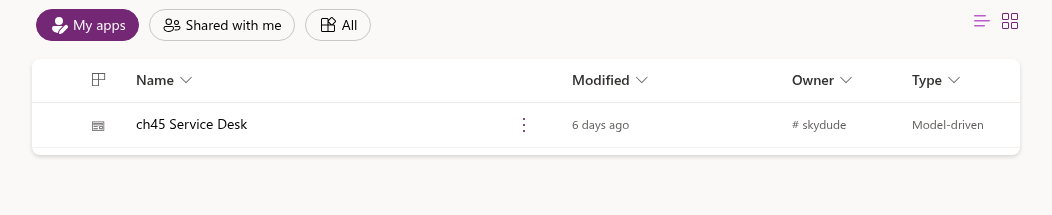
My apps, and the platform's own app modules that the listing reports are not in it.Creating an app produces its site map at the same time: the run below returned an app id, and the solution exported afterwards contained an AppModule and an AppModuleSiteMap under that same unique name.verifiedartifact: ch04-model-create · artifacts-ch04.md
Connected as skydude@itrancyngergmail.onmicrosoft.com
Creating model-driven app...
Model-driven app created successfully. App ID: 47ef4c17-7090-f111-8076-70a8a59af8d5
Publishing model-driven app...
Model-driven app published successfully.
--solution flag decides where the new app lands, and this app landed in ch45Lab because the flag named it. The --publish flag names a further operation the command performs after creating the app, which is why the output reports it on its own line.The app module lists its components by reference: the exported AppModuleComponents element names the site map by schema name rather than containing it, and an AppModuleRoleMaps element carries the security roles the app is assigned to.verifiedartifact: ch04-appmodule · artifacts-ch04.md
<AppModule>
  <UniqueName>ch45_service_desk_f93b06c5</UniqueName>
  <IntroducedVersion>1.0</IntroducedVersion>
  <WebResourceId>953b9fac-1e5e-e611-80d6-00155ded156f</WebResourceId>
  <OptimizedFor></OptimizedFor>
  <statecode>0</statecode>
  <statuscode>1</statuscode>
  <FormFactor>1</FormFactor>
  <ClientType>4</ClientType>
  <NavigationType>0</NavigationType>
  <AppModuleComponents>
    <AppModuleComponent type="62" schemaName="ch45_service_desk_f93b06c5" />
  </AppModuleComponents>
  <AppModuleRoleMaps>
    <Role id="{627090ff-40a3-4053-8790-584edc5be201}" />
    <Role id="{119f245c-3cc8-4b62-b31c-d1a046ced15d}" />
  </AppModuleRoleMaps>
  <LocalizedNames>
    <LocalizedName description="ch45 Service Desk" languagecode="1033" />
  </LocalizedNames>
</AppModule>

The XML declaration, and a Descriptions and an appsettings block before the
closing tag, are in artifacts-ch04.md.
4.2The site map: areas, groups and subareas
Areas, groups and subareas
The site map is your app's navigation. An area is the top switch. A group is a heading within an area. A subarea is the thing a user opens: a table, a dashboard, a custom page, a web resource or a URL.
An app may have several areas and an area may have several groups; deleting an area deletes every group and subarea inside it, and deleting a group deletes its subareas.citedsource: Power Apps docs — Create a model-driven app site map — Area, Group and Table
Guidance
Group subareas by the task a user is doing rather than by the table each one opens. The subarea already names its table; your grouping is what says which subareas belong to the same job.
4.2.1The site map in an unpacked solution
A site map is stored as XML under its own directory in an unpacked solution, keyed by the site map's unique name. The file nests a Group inside an Area, the way the hierarchy above does.
The designer generates an Id for each area, group and subarea, and the documentation recommends keeping it: an Id that is not unique can produce an error for a user in the app, or for an app designer importing a solution that contains the site map.citedsource: Power Apps docs — Create a model-driven app site map — the generated ID
A site map with one area and well-named groups is easier to keep coherent than one with several areas, because an area boundary is the hardest level for a user to discover and the easiest for a maker to add.experientialbasis: site maps maintained across several environments where areas were added faster than they were removed
Evidence — the generated site map, and the import a fresh environment refused
The site map generated with a new app is one Area holding one Group and no SubArea, with titles carried per language code inside Titles elements.verifiedartifact: ch04-sitemap · artifacts-ch04.md
<AppModuleSiteMap xmlns:xsi="http://www.w3.org/2001/XMLSchema-instance">
  <SiteMapUniqueName>ch45_service_desk_f93b06c5</SiteMapUniqueName>
  <EnableCollapsibleGroups>False</EnableCollapsibleGroups>
  <ShowHome>True</ShowHome>
  <ShowPinned>True</ShowPinned>
  <ShowRecents>True</ShowRecents>
  <SiteMap IntroducedVersion="7.0.0.0">
    <Area Id="area_ch45_service_desk_f93b06c5" ShowGroups="true" ResourceId="SitemapDesigner.NewArea" IntroducedVersion="7.0.0.0">
      <Titles>
        <Title Title="Main" LCID="1033" />
      </Titles>
      <Group Id="group_ch45_service_desk_f93b06c5" IsProfile="false" ResourceId="SitemapDesigner.NewGroup" IntroducedVersion="7.0.0.0">
        <Titles>
          <Title Title="Pages" LCID="1033" />
        </Titles>
      </Group>
    </Area>
  </SiteMap>
  <LocalizedNames>
    <LocalizedName description="ch45 Service Desk" languagecode="1033" />
  </LocalizedNames>
</AppModuleSiteMap>
Title carries the language-coded label a user reads, and Id is the handle the file uses for the area; the same pair appears again on the Group nested inside it.Caution
A solution carrying that generated site map was rejected by a second environment, which had never held it, with SiteMap needs to have a non-empty Area with a non-empty Group. The same zip imported into the environment the app was created in and succeeded. The message names the empty Group as the reason; no run here varies the subarea and holds the rest constant, so that is the platform's account rather than something this lab isolated.verifiedartifact: ch04-sitemap-fresh-import · artifacts-ch04.md
4.3Form types, and what each one is for
The type decides where the platform uses the form
A form is a metadata record belonging to a table, and its type decides where the platform will use it. The type is not a style: a quick create form and a main form over the same table are separate records, and you edit them separately.
The four form types, and what the platform does with each.citedsource: Power Apps docs — Types of model-driven app forms — the form type table
| Type | Where it is used | What it is for |
|---|---|---|
| Main | Model-driven apps, Dynamics 365 for tablets, Dynamics 365 for Outlook | The primary interface for viewing and interacting with table data |
| Quick create | Model-driven apps, Dynamics 365 for tablets, Dynamics 365 for Outlook | A basic form optimised for creating new records |
| Quick view | Within a main form | Displaying data for a row referenced by a lookup column, without leaving the form |
| Card | Views | A compact presentation suited to mobile devices |
Several main forms can be created for one table and assigned to different security roles, which is how one group is presented with a form optimised for how it uses the app and another group with a different one.citedsource: Power Apps docs — Design considerations for main forms — multiple main forms and security roles
A quick view form reads a related row through a lookup column already on the form, so the columns it shows belong to the related table — laid out once, and reused wherever that lookup appears.
Evidence — the forms a stock table already carries
In the lab environment the account table carries nine forms across those four types: three main, four quick view, one quick create and one card.verifiedartifact: ch04-form-inventory · artifacts-ch04.md
Connected as skydude@itrancyngergmail.onmicrosoft.com
Connected to... skylib-test

name                               type            formid                               objecttypecode
Account for Interactive experience Main            a72c7955-442b-4ea4-9499-b10cd18b4256 Account
Account Quick Create               Quick Create    c9e7ec2d-efca-4e4c-b3e3-f63c4bba5e4b Account
Account Card form                  Card            cccff382-2b92-467e-bf1b-3db179512af8 Account
Information                        Main            b053a39a-041a-4356-acef-ddf00182762b Account
Account Reference Panel            Quick View Form 098ae145-1567-41ec-8398-86dbaac70c9b Account
Account                            Main            8448b78f-8f42-454e-8e2a-f8196b0419af Account
Social Profiles                    Quick View Form 2205c86d-ed88-4a2f-a447-3b86a8781f2e Account
account card                       Quick View Form b028db32-3619-48a5-ac51-cf3f947b0ef3 Account
Account Hierarchy Tile Form        Quick View Form 69cff312-cfb6-4289-9631-249ab85d2c62 Account
Main are alternatives rather than a sequence, which is why a report of "the account form" is ambiguous until the form id is named. The formid column is that name, and it is the name the unpacked source uses too (§4.8).The portal lists those forms under labels of its own: the account table's Forms list shows nine rows, and its Form type column reads Quick View for the rows the systemform query prints as Quick View Form.verifiedartifact: ch04-shot-account-forms · artifacts-ch04.md
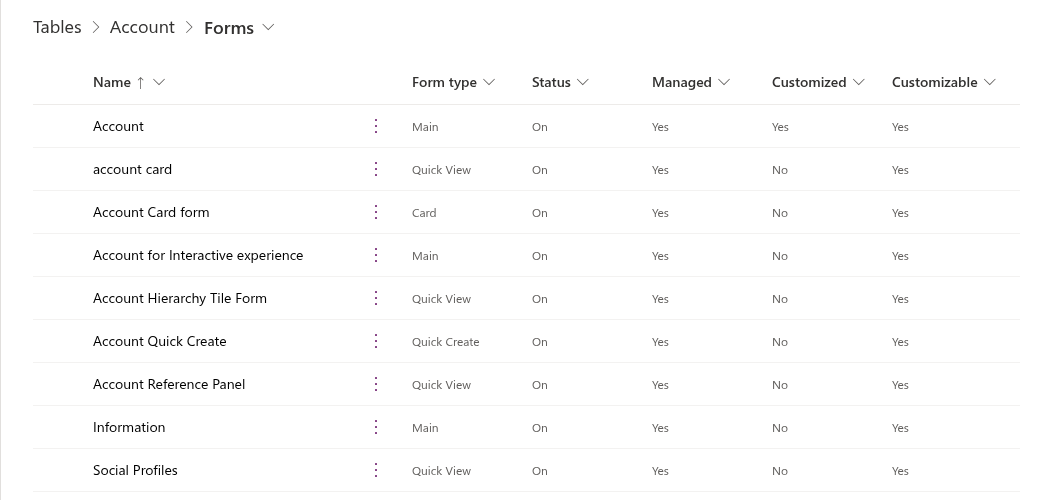
Status, Managed and Customized columns here carry state the query did not ask for.4.3.1Tabs, sections and the size of a main form
A main form is a tree: tabs hold sections, sections hold rows of cells, and a cell holds a control bound to a column.
Designing a main form once per table and deploying it everywhere it is required is stated as a design objective rather than as a property of the platform, and the maintenance cost is stated beside it: as more forms are created, more forms need to be maintained.citedsource: Power Apps docs — Design considerations for main forms — Form presentation differences
A tab that exists because the first tab filled up is a sign that columns belonging to a related table have been added to this one; a quick view form over the lookup does the same work without widening the table.experientialbasis: main forms inherited on several long-running implementations, where the second tab was where unowned columns accumulated
Guidance
Before you add a tab, check whether the columns it would hold are read rather than edited on this form. Related data you display but do not edit belongs in a quick view form, which you maintain once and which appears wherever the lookup does.
4.4Views, and where each type appears
Query type, and the view selector
A view is a saved query over one table, stored as a savedquery row. It fixes the columns, their order and width, the default sort, and the filter. Its query type decides where the platform uses it, and that is what separates a view your user can choose from one the platform reaches for on their behalf.
Views come in three kinds — personal, system and public — and the system kinds are Quick Find, Advanced Find, Associated and Lookup; a system view is absent from the view selector and cannot be used in a sublist on a form or as a list on a dashboard.citedsource: Power Apps docs — Create or edit a model-driven app view — Types of views
The four system kinds are what the platform reaches for on its own: Quick Find is the default view used when a Quick Find search is performed and defines which columns are searched, Advanced Find is the default view used to display Advanced Find results, Associated is the default view that lists the related tables for a record, and Lookup is the view displayed when a record is selected for a lookup column.citedsource: Power Apps docs — Create or edit a model-driven app view — what each system view is the default for
Evidence — the views a stock table already carries
In the lab environment the account table carries fourteen views across the four query types below: nine public, three associated, one quick find and one lookup. Four rows are marked isdefault, one in each of those query types.verifiedartifact: ch04-view-inventory · artifacts-ch04.md
Connected as skydude@itrancyngergmail.onmicrosoft.com
Connected to... skylib-test

name                                              querytype isdefault savedqueryid
Account Lookup View                               64        Yes       a9af0ab8-861d-4cfa-92a5-c6281fed7fab
Accounts: No Orders in Last 6 Months              0         No        c147f1f7-1d78-4d10-85bf-7e03b79f74fa
Account BulkOperation View                        2         No        59e57080-0cc2-e211-9b83-00155d89b902
Quick Find Active Accounts                        4         Yes       2d1187c4-23fe-4bb5-9647-43bb1c6ddbd1
My Connections                                    0         No        d234426e-1f37-4944-9255-50e19b541c4c
Active Accounts                                   0         No        00000000-0000-0000-00aa-000010001002
Account List Member View                          2         No        38a21ffb-4e32-4038-beb9-03172a0dd034
Account Associated View                           2         Yes       00000000-0000-0000-00aa-000010001200
Accounts: No Campaign Activities in Last 3 Months 0         No        cfbcd7af-aee5-4e45-8ecc-c040d4020581
My Active Accounts                                0         Yes       00000000-0000-0000-00aa-000010001001
Inactive Accounts                                 0         No        00000000-0000-0000-00aa-000010001031
Accounts: Influenced Deals That We Won            0         No        15c63745-0a6e-4322-8416-a62c84d90279
All Accounts                                      0         No        65ffaf9a-e8c5-432d-860b-32f841b00d87
Accounts: Responded to Campaigns in Last 6 Months 0         No        49fb9771-09e1-4e70-b193-198752493577
isdefault column is per query type rather than per table. So "the default view" names a different row depending on whether the platform is opening a grid, a lookup, an associated list or a quick find. The querytype values are the platform's own integers, and they are what the exported metadata carries.4.5Business rules, and where they stop
Declared logic, and the boundary it sits behind
A business rule is declared logic over one table: a condition, and actions taken when the condition holds or fails. You author it in a designer rather than in code, and it is a solution component like any other.
The seven actions a business rule can take, and the scope each one applies in.citedsource: Power Apps docs — Create business rules and recommendations — the actions table and scope
| Action | Applies to |
|---|---|
| Set Field Value | All scopes |
| Set Default Value | All scopes |
| Show Error Message | All scopes |
| Lock/Unlock | Model-driven app |
| Set Visibility | Model-driven app |
| Set Business Required | Model-driven app |
| Recommendation | Model-driven app |
You set a rule's scope to the table and all its forms, to all forms, or to one named form, and that is what makes the split in the table above matter. Scope a rule to the table and it runs on the server as well as on the form — and the server has no form to lock a column on.
Actions that apply only to model-driven apps are ignored when the rule runs server-side; business rules do not work with multiselect choices, and columns of type unique identifier and rollup columns are not supported.citedsource: Power Apps docs — Create business rules and recommendations — server-side scope and unsupported columns
Capability is not the whole comparison with script. A business rule is legible to a maker who cannot read JavaScript, the designer validates it before you activate it, and it runs on the server when its scope says so — three properties your form script does not have. The decision ladder that follows is chapter 5's subject (§5.1).experientialbasis: review of implementations where declared rules and form scripts had accumulated side by side over several release cycles
Caution
A rule that reads a column the form does not contain may simply not execute.citedsource: Power Apps docs — Create business rules and recommendations — server-side scope and unsupported columns
4.6The modern command bar and the classic ribbon
Two generations, one surface
Buttons on a grid or a form are commands. The command designer is the modern authoring surface; the classic ribbon — RibbonDiffXml inside a table's solution folder — is the older one. Both are still live, and a table's exported metadata carries the older one whether or not you have used it.
Power Fx expresses both a command's action and its visibility, and is not supported in classic commands; a modern command is displayed only within the app it was authored in, and a classic command cannot be edited in the command designer.citedsource: Power Apps docs — Customize the command bar — Use Power Fx for actions and visibility
The two generations differ in scope.
Confining a modern command to the app it was authored in is what prevents the command transferring to other apps, which is how a classic command behaved.citedsource: Power Apps docs — Customize the command bar — Use Power Fx for actions and visibility
Classic visibility rules are still supported and still exposed in solution files and in Dataverse, but they are not shown in the command designer; pre-existing classic commands cannot be customised there until they have been migrated, and the global application header and dashboard command bars are not supported by it at all.citedsource: Power Apps docs — Command bar customization limitations — classic visibility in solution files
Evidence — the empty classic elements a table exports anyway
A table with no ribbon customisation still exports a RibbonDiff.xml, carrying the empty CommandDefinitions, DisplayRules and EnableRules elements a classic rule would occupy.verifiedartifact: ch04-ribbondiff · artifacts-ch04.md
<RibbonDiffXml xmlns:xsi="http://www.w3.org/2001/XMLSchema-instance">
  <CustomActions />
  <Templates>
    <RibbonTemplates Id="Mscrm.Templates"></RibbonTemplates>
  </Templates>
  <CommandDefinitions />
  <RuleDefinitions>
    <TabDisplayRules />
    <DisplayRules />
    <EnableRules />
  </RuleDefinitions>
  <LocLabels />
</RibbonDiffXml>
Guidance
When a button behaves differently from what the command designer shows, read the table's RibbonDiff.xml in the unpacked solution before you re-author the command.
4.7Custom pages and embedded canvas apps
Custom pages, embedded canvas apps, and what each costs
When a form, a view or a dashboard will not express what your screen needs, a model-driven app gives you two ways to host canvas-style content: a custom page, and an embedded canvas app on a form.
A custom page is a page type within the model-driven app, authored in Power Apps Studio and added to the site map, while an embedded canvas app can only be placed on a model-driven form; the documentation recommends custom pages over embedded canvas apps in most cases, and advises against exceeding 25 custom pages in one app.citedsource: Power Apps docs — Converge model-driven and canvas apps using the custom page — custom pages compared with embedded canvas apps
They differ in what can reach them. A custom page is a site map destination and a target for navigation from other pages; an embedded canvas app is a control inside a form, and it sees the form's record rather than the app's navigation.
A custom page earns its place when the screen is a summary over several tables rather than a record being edited. If your screen is still one record with one save, the form it would replace is usually the cheaper answer.experientialbasis: model-driven apps where a custom page replaced a form that had grown a fourth tab of read-only summary content
Canvas content has a pac surface of its own, smaller than the solution commands used elsewhere in this chapter.
A custom page uses a special canvas app type that can be used within a model-driven app and nowhere else, and custom pages do not count toward app limits because they are treated as a page rather than as an app.citedsource: Power Apps docs — Converge model-driven and canvas apps using the custom page — a special canvas app type
pac canvas pack and pac canvas unpack are deprecated, and the CLI reference points a team wanting canvas app sources under source control at Power Platform Git Integration instead; pac canvas download and pac canvas list are not deprecated.citedsource: Power Platform CLI reference — canvas command group — pack and unpack deprecated
Evidence — what the canvas surface reported for the lab
pac canvas list reports the canvas apps an environment holds, and printed a header row and no rows for the lab environment, which holds none.verifiedartifact: ch04-canvas-list · artifacts-ch04.md
Connected as skydude@itrancyngergmail.onmicrosoft.com
Name Created by Modified on
Caution
A custom page is a separate solution component, which is what allows one maker to edit one custom page at a time; a page with several screens is still a single component, so the same holds across them.citedsource: Power Apps docs — Converge model-driven and canvas apps using the custom page — one maker at a time
4.8The app in source: what an export carries
Layers, paths, and the difference between them
The components above are metadata, so you can read them as text. Export a solution and unpack it and you get a directory of XML in which each component sits at a predictable path.
Editing the solution file to change a solution component other than a ribbon, a form, the site map or a saved query is not supported; defining a new component that way is not supported; editing a web resource file exported with a solution is not supported. Using RibbonDiffXml to add, remove or hide ribbon elements is supported.citedsource: Power Apps docs — Get started with customization using code — editing the customizations file
An export carries the layer your solution owns rather than the component as a whole. On a custom table the two coincide, because the solution that created the table owns its columns and forms. On a stock table they do not.
The solution does carry one customised form, sharded by SolutionPackager into its own file under FormXml/main/. What that file records — a script library and a handler registration, and what the export of a stock form does and does not carry — is chapter 5's subject (§5.2).
Evidence — the paths the unpack wrote, and the layer the export owns
An app module, a site map, a form and a script web resource land at four distinct paths in the unpacked source, and a form's file is named for its formid.verifiedartifact: ch04-unpack-tree · artifacts-ch04.md
unpacked3/AppModules/ch45_service_desk_f93b06c5/AppModule.xml
unpacked3/AppModuleSiteMaps/ch45_service_desk_f93b06c5/AppModuleSiteMap.xml
unpacked3/Entities/Account/Entity.xml
unpacked3/Entities/Account/FormXml/main/{8448b78f-8f42-454e-8e2a-f8196b0419af}.xml
unpacked3/Entities/Account/RibbonDiff.xml
unpacked3/Other/Customizations.xml
unpacked3/Other/Relationships/Account.xml
unpacked3/Other/Relationships/powerpagecomponent.xml
unpacked3/Other/Relationships.xml
unpacked3/Other/Solution.xml
unpacked3/WebResources/ch45_formHandlers.js
unpacked3/WebResources/ch45_formHandlers.js.data.xml
formid from §4.3, under a directory named for the table. One file appears here per form the solution customised, which for this solution is one. The table's other forms, which this solution did not change, do not appear here.The app module and its site map are separate root components of the solution — types 80 and 62 — so one can be carried without the other.verifiedartifact: ch04-root-components · artifacts-ch04.md
The account table's own metadata carries no change from this solution, and its Entity.xml says so: unmodified="1", an empty <attributes /> and an empty <RibbonDiffXml />. The form this solution did change is not in that file — <FormXml /> is empty too, and the form is sharded into its own file beside it.verifiedartifact: ch04-entity-unmodified · artifacts-ch04.md
<Entity xmlns:xsi="http://www.w3.org/2001/XMLSchema-instance">
  <Name LocalizedName="Account" OriginalName="">Account</Name>
  <EntityInfo>
    <entity Name="Account" unmodified="1">
      <attributes />
    </entity>
  </EntityInfo>
  <FormXml />
  <RibbonDiffXml />
</Entity>